
Some accounts are easy to abandon. You stop opening the app, the notifications pile up, and eventually you forget the password. A DeviantArt profile is rarely like that. It usually carries years of drawings, half-finished ideas, old conversations, and the faces of people who once cheered you on. Walking away from it deserves a plan, and that plan starts with one slightly awkward fact: the site does not offer a plain “delete my account” button. What it offers is deactivation, and deactivation is the doorway to deletion.
This guide explains the whole journey in everyday language. You will learn how to prepare, how to complete the process on a computer or phone, what the site does with your content afterward, how to go beyond the surface and ask for your personal data to be erased, and what to do if you hit a wall along the way.
Before you start: Websites rearrange their menus and rename buttons from time to time. The steps here are based on publicly available instructions and may look a little different on your screen. When in doubt, treat DeviantArt’s own Help Center as the final word.
The Short Version
| What you want to know | What to expect |
| Name of the process | Deactivation |
| Where it happens | Your account settings, while signed in |
| What you need | Your password and access to your account email |
| How long the steps take | Around ten minutes |
| When content disappears from view | Right away |
| When it is removed for good | After a waiting period, reported to be roughly 21 days |
| Is it reversible? | Only during that waiting period, and only if Customer Support agrees to help |
Why the Wording Matters
Most people assume “deactivate” is the gentle option, the kind of pause you take before coming back. On DeviantArt that assumption can hurt you. Deactivating immediately hides your gallery, journals, and posts from everyone, and it kicks off a countdown toward permanent removal. If you only want a rest, this is the wrong tool. If you genuinely want out, it is the right one, and you should think of it as the first move in a two-part process rather than a harmless timeout.
There is also a third layer that people often overlook. Taking down your public account is not necessarily the same as wiping every record a company keeps about you. Businesses sometimes retain certain information for security, legal, or administrative reasons. If your goal is privacy rather than just tidiness, you will want to send a separate data request, and later in this guide you will find out how.
Is Leaving the Right Move?
Pause for a minute and be honest about what is bothering you, because the answer changes what you should do.
If you are tired of the site but proud of your old work, you may only need to stop logging in or trim your gallery. If you are uneasy about how artwork is handled in the era of AI, you could review the opt-out controls DeviantArt has offered, though many artists decide that removing their work entirely feels safer. If you are being harassed, the block and mute tools might solve the problem faster than a full exit. And if you simply found an ancient account and want it gone, deactivation is exactly what you need.
Nothing here is a wrong answer. The point is to make the choice deliberately, since the final stage cannot be undone.
Getting Ready: What to Do Before You Press Anything
The best time to protect your work is before you leave, not after. Treat this section as a moving checklist and spend as long on it as you need.
Rescue your artwork
Start with your own devices. Old files often hide in downloads folders, camera rolls, external drives, or cloud storage, and the originals will always beat a re-downloaded copy in quality. For anything you cannot find, go through your gallery and use the download option on each piece where the site permits it. Not every upload can be saved this way, because that depends on how it was posted and its settings, so check as you go. Sorting the results into folders by year or series now will make your life easier later if you decide to build a portfolio somewhere else.
Keep your words
Journals, poems, story chapters, and the little notes you attached to your pictures vanish with the account. Copy anything you want to keep into a document. If something was written jointly with another person, ask them before you remove it.
Hold on to your people
The hardest thing to replace is rarely a file. It is the handful of artists whose work you followed for years. Write down their usernames and, wherever possible, trade another way to reach each other, such as a social handle or an email address. If you run or belong to groups, tell the others you are leaving so nobody is left wondering.
Wrap up any money matters
Unfinished commissions, unpaid invoices, and stored balances do not survive account removal. Complete them or cancel them openly, and keep receipts and conversations related to paid work in case you need them for your records.
Stop any paid membership
If you pay for a premium plan, cancel it where you originally signed up, whether that was on the website or through an app store. Do not assume that closing the account will stop the billing, and keep the cancellation email as proof.
Sort out your login and your inbox
This is where many people get stuck. If you originally registered using a Google or Facebook login, you may never have created a DeviantArt password. The process asks for one, so use the Forgot Password link to make one first. Also confirm that you can open the email address on the account, because that is where the confirmation message will arrive. If the address is outdated, change it in your settings before you begin.
Ask for a copy of your data
If you would like an archive of what the platform holds about you, request it now. After the removal runs, that option may disappear along with the account.
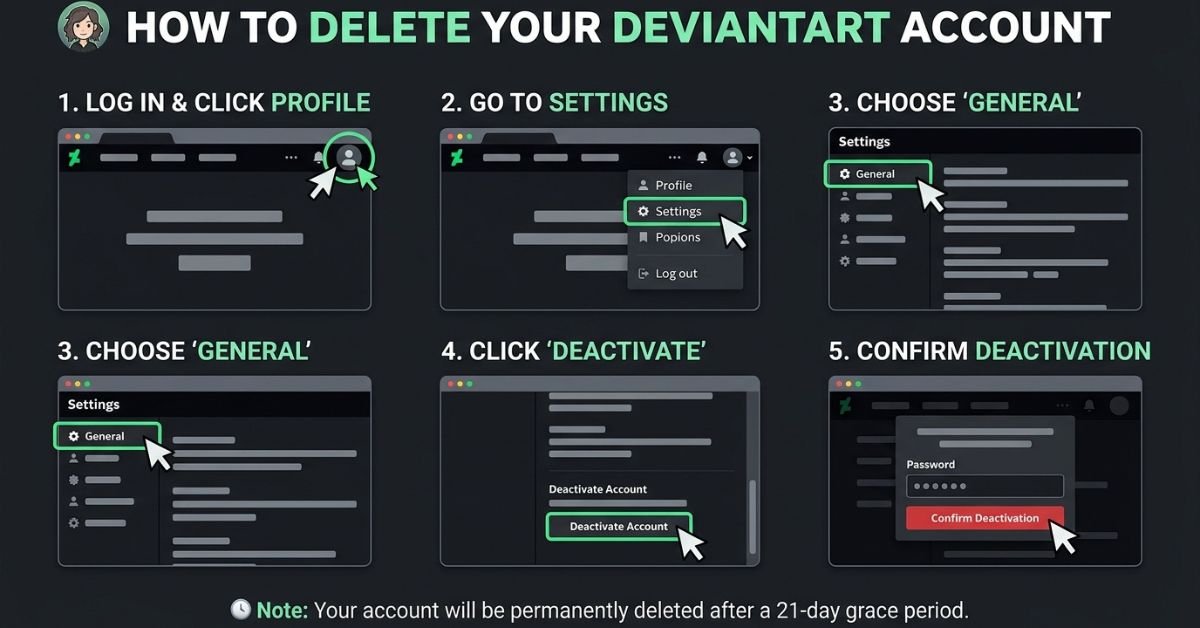
Closing Your Account From a Computer
Working from a desktop or laptop is the most dependable route, so use it if you can.
- Sign in to the account you want to close, and glance at your username to be sure it is the right one.
- Open your settings by clicking your profile picture or name, then choosing the settings or account option.
- Look for the deactivation link. It tends to sit lower down in the account area, so keep scrolling.
- Read the explanation the site shows you. It describes what will happen to your profile and content.
- Choose “Yes, deactivate my account” and enter your password when asked.
- Request the verification email by choosing “Yes, send me the verification email.”
- Open that email, checking your spam and promotions folders if it is not in the main inbox, and click the green Deactivate account button.
- Confirm once more on the page that opens by selecting “Yes, deactivate my account.”
- Pick a reason for leaving and click Confirm to finish.
- Save your evidence. Take a screenshot of the final page and keep the email, which will help if you ever need to contact support.
Closing Your Account From a Phone
Reports suggest the mobile app follows a similar path. Sign in, tap your profile icon, find your account settings, and look for the deactivation option. Enter your password, complete any verification, and then open the confirmation email on the same phone to finish the job.
If the option is not visible in the app, do not waste time hunting for it. Open DeviantArt in your phone’s web browser, switch to the desktop version of the site through the browser menu, and follow the computer steps above. Keep your connection steady and avoid leaving the process half done, since pages can time out and confirmation links often expire quickly.
What the Site Does Next
The moment you finish, your profile and content stop being visible to other people. After that comes a waiting period that has been reported as lasting about three weeks. During this time your material is queued for removal rather than erased on the spot. Some sources say Customer Support may be able to halt the process if you contact them, though nothing here is guaranteed, and simply signing back in should not be treated as a way to cancel it. If you are having second thoughts, write to support right away and be clear about what you want.
When the waiting period ends, the removal is carried out and your account and its content are gone from the site. From that point on, the only copies of your work are the ones you saved yourself.
It helps to be realistic about what deletion cannot reach. Anything another person downloaded or reposted while your work was public may still exist. Search engines sometimes keep old snapshots of pages for a while. Web archives may have captured your gallery. And comments or replies left by other users about your work can remain visible on their own pages. Deleting your account takes your work off DeviantArt, not off the entire internet.
Asking for Your Personal Data to Be Erased
If privacy is the heart of your decision, treat deactivation as step one and a data request as step two. According to a recent guide, the account needs to be deactivated before the removal of your data can begin. DeviantArt’s privacy policy points to a process for requesting a copy of your data and for asking that it be deleted, so look for that link in the policy or in the personal data area of your settings, and keep records of everything you send.
Your legal situation may strengthen your hand. Residents of the European Union and the UK are covered by the GDPR, which can include the right to access and erase personal data. California residents have comparable rights under the CCPA and CPRA, and many other countries have their own rules. Eligibility differs from place to place, so take this as general background rather than legal advice.
If you need wording, you can adapt something like this:
Subject: Request to delete my personal data
Hello,
I have deactivated my DeviantArt account (username: [your username], email: [your email]) and would like all personal data connected to it to be deleted. Please confirm once this is done, and tell me if you need anything further to verify that the account is mine.
Thank you, [Your name]
People who are concerned about AI should note that DeviantArt has provided opt-out controls, including a “NoAI”-style option on individual deviations. These are independent of account deletion. If you are staying for the time being, they are worth reviewing. If you are leaving, a data request is the more thorough answer.
Tricky Situations and How to Handle Them
You signed up through Google or Facebook. Create a password with the Forgot Password link first, then continue with deactivation.
You own or help run a group. See whether leadership can be passed on, and warn the members. Otherwise the group may end up with nobody in charge.
Your account was hacked. Reset your password using your email, change the email account’s password too, and report the incident to Customer Support. Decide afterward whether you want to keep the account.
You have several accounts. Each one must be closed separately. Do not open a new account to dodge trouble with an old one; ask support for help instead.
The account belongs to a child. A parent or guardian can assist, though the login details and email access are normally still needed. If you lack them, contact support.
The account belonged to someone who has died. The standard method needs the person’s credentials. If you do not have them, contact Customer Support, explain gently and clearly, and prepare to provide documentation. Because policies can change, ask what they require at the moment.
The account is suspended or locked. Reach out to support and ask how closure works in your case.
When Something Goes Wrong
The deactivation option will not appear. Confirm you are signed in, look through every account settings page, try the desktop version, and search the Help Center for the word “deactivate.”
You cannot remember your password. Use the reset link on the sign-in page. If the reset message does not show up, check the spam folder and make sure you are using the correct address.
The confirmation email is missing. Give it a few minutes, then search your inbox for “DeviantArt,” look in spam, junk, and promotions, confirm the address on file, and request a new message. Adding the sender to your safe list can help.
The email link has expired. Return to the deactivation page and ask for a fresh message, then click the link without delay.
You no longer control the email address. Try your email provider’s recovery tools. If that fails, contact DeviantArt Customer Support with whatever proof of ownership you can gather, such as your username, roughly when you joined, when you last signed in, and any payments you made.
The site is blocked where you live. A VPN may help, but make sure that is lawful in your country and pick a reputable service.
Pages keep freezing. Switch browsers, clear your cache, turn off extensions for a while, or change your connection.
You regret the decision. Contact support immediately. Time matters here, so do not wait until the end of the waiting period.
Tidying Up After You Go
After your account is gone, it’s worth spending a few minutes on cleanup. Go through the places where people might still find a link to your old DeviantArt page and swap it for your new one, or remove it. Typical spots are your social media bios, online portfolio, email signature, forum profiles, commission rate sheets, and CV. Then type your old username and a few of your most recognizable artwork titles into a search engine. If outdated pages still appear, most search engines let you submit a request to have them taken out of the results.
If you discover someone reposting your work without permission, you can contact them or the host platform, and if necessary file a copyright takedown notice, bearing in mind that the rules differ by country. Let your followers know where you are going next with a short announcement on your new platform. Finally, take advantage of the momentum to review your other online accounts. Searching your inbox for phrases such as “welcome” or “confirm your email” tends to uncover a surprising number of forgotten sign-ups. While you are at it, give each account its own password, think about using a password manager, and switch on two-factor authentication wherever it is available.
Gentler Options Worth Considering
You may not need a full goodbye. If you just want distance, stop signing in, silence notifications, and remove the app from your phone. If a few pieces bother you, remove only those. If privacy is the issue, hide your birthday, tighten who can message you, and make use of the block and mute features, remembering that some of these carry cooling-off periods. You can also rewrite your bio and change your avatar if the problem is that your profile no longer feels like you. A few people keep an almost empty account purely to hold on to their username.
Finding a New Home for Your Art
Leaving does not have to mean going silent. A personal website gives you the most control over how your work is displayed and what happens to your data. Portfolio platforms like ArtStation and Behance suit professional presentation, while social networks such as Instagram, Bluesky, and Mastodon make it easier to meet new audiences. Smaller communities built around specific styles or fandoms can feel more intimate, and print-on-demand shops let you turn artwork into products. Read the terms and privacy practices of anywhere you plan to upload, and keep your files stored in at least two separate places.
Your Final Checklist
- [ ] My artwork and writing are saved in at least two places
- [ ] I have the contact details of the people I want to stay in touch with
- [ ] Open commissions and payments are settled
- [ ] Any paid membership is cancelled and I kept the confirmation
- [ ] I have a working password and can open my account email
- [ ] Groups I manage are handed over or announced
- [ ] I completed deactivation and saved screenshots and emails
- [ ] I sent a data deletion request, if I wanted one
- [ ] I updated links elsewhere and will check search results after the waiting period
Closing Thoughts
Saying goodbye to a DeviantArt account is quick to do and slow to regret, which is exactly why a little preparation pays off. Remember that deactivation is the beginning of deletion rather than a pause, save everything you care about first, and take care of your login and email before you start. Complete the confirmation steps, mind the waiting period, and send a separate request if you want your personal data erased as well. Then tidy up the rest of your online presence and decide where your art will live next.
Done carefully, leaving can feel less like losing something and more like moving to a place that suits you better.
Questions People Often Ask
Can I really delete my DeviantArt account for good?
Yes. Deactivation hides your content and starts a countdown to permanent removal.
How long does the removal take?
Sources point to around 21 days. Check the Help Center for the latest figure.
Can I bring the account back?
Possibly during the waiting period, if support is willing to help. After that, assume it is gone.
Will my art disappear from the whole internet?
No. Saved, reposted, or cached copies elsewhere may remain.
Can I get my username back later?
There is no promise of that, so do not count on it.
Does leaving cancel my paid plan?
Not necessarily. Cancel it yourself through the place where you bought it.
Do I have to explain why I am leaving?
The last step asks you to pick a reason, and it is part of finishing the process.
Is deactivation the same as erasing my data?
No. A separate data request is the way to ask for that.
Can another person close my account on my behalf?
Only if they have your login credentials and can open the email linked to the account. Otherwise, a genuine representative would need to go through DeviantArt Customer Support.
Is it worth paying a third-party service to remove my account?
Usually not. The steps are simple enough to do yourself, and sharing your password with a stranger is a risk you can avoid.
Disclaimer: This guide is for general information only. Steps, menu names, and timelines come from publicly available sources and may change, so confirm the current process with DeviantArt’s official Help Center before acting. Nothing here is legal advice.